Restoration Studio: operator guide
The studio turns a tree of scanned TIFF frames into an Internet Archive "texts" item per book: cleaned page images, an hOCR text layer, a distribution PDF, a PDF/A-2b master, an EPUB, and the IA metadata files. Workers do the heavy lifting in the background. The operator steps in only where the machine is unsure: a region it could not classify, a page that needs a different crop, or a book the quality gate flagged.
This guide follows one book from import to publication. The screens are described in Studio UI; the contract between the parts is in design/studio-spec.md.
1. Start the studio
Locally, everything except Postgres and Redis runs from the repository's venv (full commands in deploy/dev/README.md):
docker compose -f deploy/dev/compose.yml up -d                  # Postgres :55432, Redis :56379
export STUDIO_CONFIG=$PWD/configs/studio.dev.toml
evilflowers-digitalizer studio migrate                          # schema (alias of db-upgrade)
evilflowers-digitalizer studio serve --port 8000                # API + the built SPA
evilflowers-digitalizer studio worker -Q interactive,cpu,ai,io  # one worker, every queue
Build the SPA once with pnpm --dir frontend install && pnpm --dir frontend build; the API
serves it from frontend/dist at http://127.0.0.1:8000. For SPA development, pnpm
--dir frontend dev serves it on :5173 and proxies /api to the API.
There is no login: the studio is reachable only over the VPN. Click Set your name in the top bar once. The name is kept in the browser and recorded on every note, review and region edit.
2. Import a collection
A project ([projects.<slug>] in the studio config) says where the scans are and how
books are named:
| key | example | meaning |
|---|---|---|
scans_root |
/data/raw-scans |
the read-only scan tree |
book_pattern |
{collection}/*-skeny/{book} |
where a book's directory is; {collection} and {book} are captured |
frames_glob |
stream_pages_tif/*.tif |
frames inside the book directory |
item_id |
stu-{collection}-{book} |
the permanent IA identifier (lowercased, never renamed) |
auto_publish |
never / gate / review |
when a book goes to the catalog by itself |
On the Dashboard, click Import next to a collection (or Import all). Discovery
runs on the io queue and adds one row per book in status discovered; nothing is read
except directory listings. From the CLI: evilflowers-digitalizer studio import stu-local fei.
3. Run a book
Open the book and click Full run. The run goes through five stages, each visible live in the run log:
- clean: spread detection decides the leaves once (two per spread, LEFT/RIGHT), then ScanTailor splits, deskews, crops and binarises each leaf; previews and Deep Zoom tiles are written.
- analyze: Tesseract OCR plus the layout detectors (the heuristic by default,
DocLayout-YOLO when configured) propose regions;
fuse()merges them, and regions the detectors disagree on become disputed. - formulas: formula regions go to PaddleOCR-VL when
formula_recognizerispaddleocr-vl(local tool venv) orpaddleocr-vl-http(thevlmservice, see Formula recognition service); withnonethey stay images. - render: the IA item files, the PDFs and the EPUB, from the access leaves only.
- gate: the quality signals decide
approved, orreviewwith the flags listed.
On the synthetic 6-frame test book a full run takes about two minutes on a laptop: 12 leaves, 168 regions, OCR confidence 86, and the gate flags "44/44 formulas left as images" because no formula recognizer is configured.
Layout detectors
layout_detectors lists the detectors whose proposals fuse() merges. Two that disagree
are what turns a region disputed, so a second detector is worth its CPU time.
| name | what it is | needs |
|---|---|---|
heuristic |
the reflow analysis over hOCR and pixels, plus the blue-stamp mask | nothing |
doclayout (alias yolo) |
DocLayout-YOLO, DocStructBench classes, ONNX on CPU | onnxruntime, the model file |
The doclayout model is the ONNX export
wybxc/DocLayout-YOLO-DocStructBench-onnx,
converted from juliozhao/DocLayout-YOLO-DocStructBench. Both model cards state
Apache-2.0. The metadata embedded in the graph still carries the Ultralytics AGPL-3.0
boilerplate of the training code. The studio uses only the weights, never that code.
Install the model once per worker:
mkdir -p ~/.local/share/evilflowers-tools/models/doclayout-yolo
curl -L -o ~/.local/share/evilflowers-tools/models/doclayout-yolo/doclayout_yolo_docstructbench_imgsz1024.onnx \
  https://huggingface.co/wybxc/DocLayout-YOLO-DocStructBench-onnx/resolve/main/doclayout_yolo_docstructbench_imgsz1024.onnx
# sha256 fece9af02f618b603ff7921ccec6861d13e7e1f9830e091dfb7e8ad9311e5b21
Settings live in [projects.<p>.pipeline.layout]: model (defaults to the path above),
conf (0.25), iou (0.5, per-class NMS), imgsz (1024) and threads (0 means all
cores). The model maps abandon (running heads, folios) to page header or footer by
position, and equation numbers (formula_caption) to caption. Only the ONNX graph is
loaded. The PyTorch .pt checkpoint is a pickle and the studio never opens it.
On an M1 Max a 600 dpi leaf takes about 1.2 s with all cores and 2.3 s with two threads. On the 12-leaf test book the two detectors produced 237 regions, 12 of them disputed.
Formula recognition service
In k8s the nodes have no GPU, so PaddleOCR-VL-1.6 (0.9 B, Apache-2.0) runs on CPU as its
own Deployment, vlm (evilflowers_books_digitalizer/vlm_service, Dockerfile target
vlm, weights baked in at a pinned Hugging Face revision). worker-ai's studio.formulas
calls it with formula_recognizer = "paddleocr-vl-http":
[projects.stu.pipeline.vlm]
url = "http://vlm.digitalizer.svc.cluster.local:8000"
batch_size = 4        # crops per request
timeout_s = 900       # read timeout of one request (queueing included)
attempts = 6          # on 503 / connection errors, backoff 2 s doubling to 60 s
The client crops each region exactly as the local sidecar does (10 px padding, aspect
ratio padded to at most 10:1, at most 1280×28×28 pixels) and posts PNGs to
POST /v1/formulas; each item comes back with text or a per-item error. The
service runs one crop at a time per pod; two more requests may wait, and any beyond that
get 503 with Retry-After, which the client honours. A region that fails, times out
or comes back empty stays an image crop. The stage's guards (fix_latex,
looks_hallucinated) judge the answers exactly as for the local sidecar.
GET /readyz turns 200 once the model is loaded; GET /healthz is 500 if loading failed.
vlm is off by default (replicas 0, control has no CPU to spare for it permanently):
kubectl -n digitalizer scale deploy/vlm --replicas=1
kubectl -n digitalizer rollout status deploy/vlm     # waits for /readyz
# run or re-run the books, then
kubectl -n digitalizer scale deploy/vlm --replicas=0
While it is down, studio.formulas fails after its retries (about two minutes) and the
stage can be re-run later.
Expected throughput (measured 2026-11-07 on an Apple M-series CPU, 4 torch threads,
fp32, KV cache on, 10 formula regions of fyzika_vektory):
| per formula | notes | |
|---|---|---|
| display formula, one line | 2.5–9 s | e.g. \int A\cdot d\boldsymbol{r}, a three-term limit |
| page-wide two-line region | ~22 s | usually prose with math the heuristic labelled formula |
| mean over the 10 | 8.4 s | ≈ 430 formulas per hour per pod at 4 cores |
| model load | ~6 s | from a local SSD; RSS 3.8 GiB once serving |
| through HTTP | 8.45 s | HttpFormulaRecognizer → service, 10 regions in 3 batches: same LaTeX |
bfloat16 was 2.5–4.6× slower than float32 on this CPU (no native bf16 matmul) and
changed some outputs, so the service runs float32 (VLM_DTYPE). An x86 node with AMX
might reverse that; measure before switching.
The checkpoint ships use_cache: false in its generation config; the service turns the
KV cache on (VLM_KV_CACHE=1), which gave byte-identical LaTeX on all 10 regions and was
3.6× faster (30.5 s mean without it). At the pod's 1-CPU request with no idle cores to
burst into, expect roughly 4× the times above. The math-dense 53-page book of
docs/reflow_edition.md had ~180 VLM regions, so about 25 minutes of CPU at 4 cores.
Quality on the sample: real formulas came back exact (\Delta P=(\Delta P)_{x}+…
=\frac{\partial P}{\partial x}\Delta x+…, s=2\mathrm{~m}/\mathrm{s},u=-9,81\mathrm{~m}\cdot\mathrm{s}^{-2}).
Two regions that were really Slovak prose with inline math came back as letter-spaced
\begin{array} text — those are layout mistakes (they should be text regions with
the OCR: prompt), and the reviewer should re-label them. A fragment cut out of a
larger formula (dt (dt) (dt)) is read faithfully, i.e. uselessly.
4. Review a flagged book
The Review queue lists flagged books, lowest score first. j/k move, o opens,
a approves. On the book screen, the Quality gate panel says why the book was
flagged and the leaf grid marks pages with disputed regions.
Open a leaf to get the page studio:
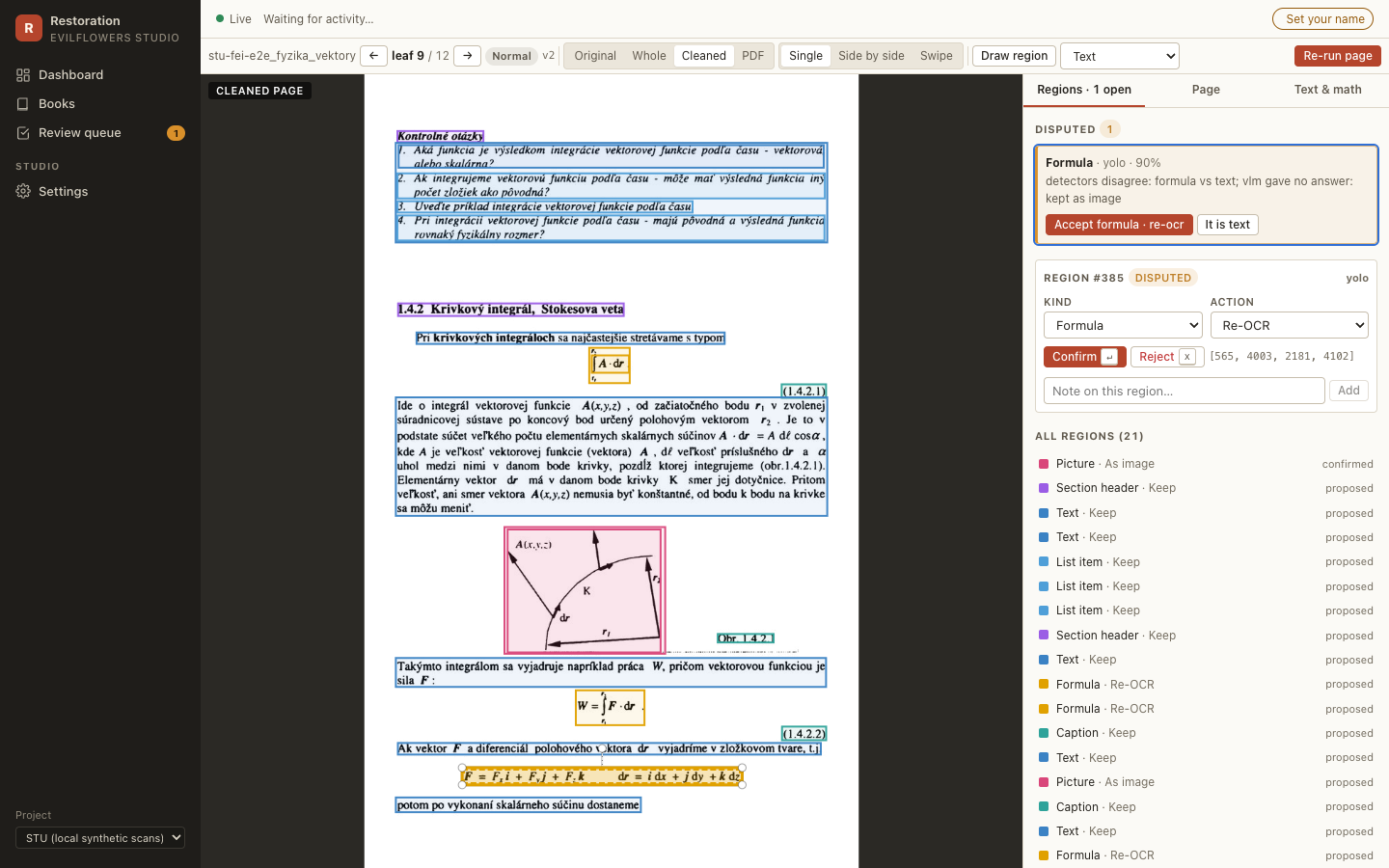
- Disputed regions are listed first, with the reason. Accept confirms the proposal; It is … relabels it in one click.
- Select any region (click it, or use the list) to change its kind and its action:
keep,remove(erased from the page image before OCR),as image(left out of the text layer) orre-OCR. Drawing a new rectangle creates a confirmed operator region. Keys:ttext,fformula,btable,ppicture,sstamp,xreject,Enterconfirm,←/→previous/next leaf. - Text & math edits the OCR text of a region; formula LaTeX has a live KaTeX preview.
- Page holds the IA leaf fields (page type, printed page number, include in access) and the overrides for the next re-run (crop, deskew, split, despeckle, colour mode, OCR language).
Rejected regions are never deleted, so a re-run cannot bring a rejected stamp back.
5. Re-run a page
After changing overrides or confirming remove regions, click Re-run page. It runs
clean → analyze → formulas for that one leaf on the interactive queue (about 5 seconds
for a test page), bumps the page version, and the viewer swaps to the new tiles when the
page.updated event arrives. Operator decisions survive the re-run: confirmed and
rejected regions are kept and absorb overlapping detector proposals; notes on replaced
machine proposals move to the page.
A re-run does not rebuild the book's PDFs. Click Re-render on the book (or approve
it, which re-renders) to bring page edits into the outputs and into _scandata.xml.
6. Approve and publish
Approve on the book records the review and marks every leaf done. Unless the
project's auto_publish is never, approval enqueues a render run and then a publish
run; the publish run waits until the render has finished. Needs work sends the book
back to review; Reject is recorded only.
Publishing creates or updates the EvilFlowers catalog entry. A republish updates the same entry and appends a publication row with the next version number.
Only the distribution files are published (<id>.pdf, <id>.epub; never the PDF/A
master), and they are uploaded to the catalog. A republish replaces them: each new
file is uploaded first, then the entry's older files of the same type are deleted, so a
failed republish never leaves the entry without its PDF, and the next one cleans up any
leftovers. Files of other types on the entry stay. When a new book collides with an
existing entry of the same ISBN, the studio adopts that entry, keeps its metadata and
files, and adds only the formats it lacks.
publish.files_base_url (linking the files in place instead of uploading them) is not
supported yet: the catalog API cannot create URL-backed acquisitions. A project that
sets it fails at publish time with an error saying so; remove the key to upload. The
needed server change is in catalog-protocol-requests.
7. Get the files
Everything lives under <artifacts_root>/<project>/<item_id>/, laid out like an IA item:
| file | what |
|---|---|
<id>_meta.xml, <id>_scandata.xml, <id>_page_numbers.json, <id>_files.xml |
IA metadata and leaf data |
<id>_jp2.zip |
cleaned pages of all leaves as JPEG 2000 |
<id>_hocr.html, <id>_djvu.txt |
text layer per leaf, plain text |
<id>.pdf, <id>_archival.pdf, <id>.epub |
distribution PDF, PDF/A-2b master, reflow edition |
<id>_studio/ |
studio-only previews, tiles and regions.json |
The book screen's Downloads panel serves each file, and IA export (.zip) builds a
zip that unpacks into an IA item directory. From the CLI:
evilflowers-digitalizer studio export-ia <book-id-or-item-id> --out exports/.
studio export-training <project> writes the confirmed regions as COCO / DocLayNet JSON
with page crops, for training a layout model.
Troubleshooting
| symptom | cause / fix |
|---|---|
A run stays queued |
no worker consumes its queue: check celery … inspect active_queues |
| Render fails with "access leaves without cleaned image" | the scratch cache (cache_dir) was evicted: run a full run or re-run those leaves |
| The original layer says the frame is missing | the scan mount is offline; cleaned pages and PDFs still work |
| Tiles do not change after a re-run | hard-reload; tile URLs carry ?v=<page version> |
studio serve fails with "configs/studio.toml" |
set STUDIO_CONFIG or pass --config |